
Account structure for a multi-location CRM network
One account per location or one shared account? How the week-one decision shapes reporting, phone numbers, permissions, and franchisee exits.
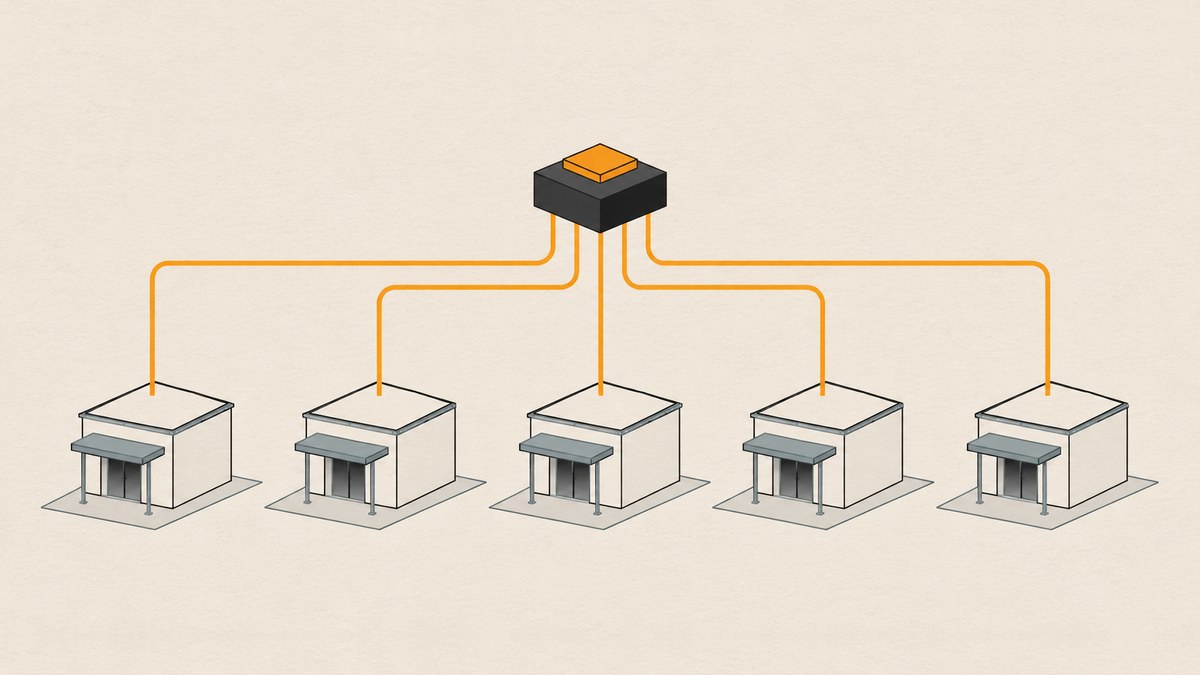
Most multi-location GoHighLevel problems trace back to one decision made in week one: how the sub-accounts are structured. Get it right and rollout, reporting, and franchisee handover stay boring. Get it wrong and you spend months untangling contacts, phone numbers, and automations built in the wrong container.
This is the structure we use when we build networks for operators, and the trade-offs to understand before you click "Add Sub-Account" for the first time.
The default: one sub-account per location
In GoHighLevel, almost everything meaningful lives at the sub-account level: contacts, pipelines, calendars, phone numbers, domains, email sending reputation, users, and automations. Because of that, the default structure for a multi-location network is one sub-account per location, sitting under a single agency account that HQ controls.
That structure gets several things right:
- Each location gets its own phone number and its own texting compliance registration — required once locations text customers independently.
- Calendars, pipelines, and review requests stay separate per site, so a lead at Location A never lands in Location B's pipeline.
- Location staff can be scoped to their own sub-account. They see their site's data, not the network's.
- A franchisee exit or resale becomes a clean handover of one container instead of an archaeological dig.
- Per-location reporting exists natively from day one.
When a single shared sub-account makes sense
There is one scenario where we don't split: an owner-operator running two or three sites with the same staff, the same phone number, and no franchisee boundaries to respect. In that case, one sub-account with a location custom field or tag is simpler and cheaper to operate.
What breaks as you grow past that:
- One phone number and one sending reputation shared by every location.
- User permissions get complicated fast — "who can see which location" becomes manual filtering instead of a hard boundary.
- Reporting blends sites that should be compared side by side.
- You can't hand one location's data to a buyer, partner, or franchisee without exporting everything.
If franchising is anywhere on the roadmap, start with one sub-account per location. Retroactive separation costs far more than early structure.
The HQ layer: the agency account is your network standard
Under this model, the agency account is HQ. It holds the master snapshot — the network standard every location deploys from. That snapshot should carry the standardized pieces: pipeline stages, custom fields, tags, calendar and automation templates, and core messaging.
Three habits keep the layer clean:
- Naming convention. Sub-accounts named consistently — brand, city, location code — so admin work and reporting never require guesswork.
- Scoped users. HQ admins sit at the agency level across all sub-accounts. Location users get exactly one sub-account.
- Right plan tier. The entry-level agency plan caps how many sub-accounts you can run. Networks live on the unlimited tier — budget for it before rollout, not during.
One principle ties it together: HQ defines the standard once, locations deploy it, and ownership of the entire structure stays with the client rather than an outside agency. That's the backbone of how we build multi-location CRM systems on GoHighLevel — the network standard, the location rollout, and the keys stay yours.
What does not roll up — plan for it
Native GoHighLevel is per-sub-account by design. Four things surprise operators every time:
Reporting
Each sub-account reports on itself. There is no native HQ dashboard that aggregates every location out of the box. Rollups come from agency-level dashboard work, a reporting connector into a BI tool, or scheduled exports. Decide which one HQ will actually use before rollout — not after the first franchisee asks for numbers.
Contacts
Contacts don't sync across sub-accounts. A customer who belongs to two locations exists twice, and that's usually correct — each site runs its own journey. What you need is a policy: when does HQ need a network-wide view, and where does that view live?
Snapshot updates
Editing the master snapshot only affects future deployments. Existing locations do not inherit changes. Network-wide updates are a process you run deliberately — more on that below.
Phone and email infrastructure
Each sub-account carries its own number, its own carrier compliance registration, and its own email reputation. For a franchise, that's a feature. For your rollout timeline, it's a line item: registration and warm-up take calendar time per location.
Rollout discipline: run the same sequence every time
Every location deployment should follow the same order. Ours looks like this:
- Deploy the master snapshot into the new sub-account.
- Provision the location's phone number and submit compliance registration.
- Connect the location's domain and email sending domain.
- Build the location's calendars and assign staff users.
- Import or verify contacts and pipelines.
- Run a test lead end to end — form, automation, appointment, follow-up.
- Flip live.
Same sequence, every location, documented deviations only. This is what makes location twenty as predictable as location two.
Handling network-wide changes without drift
The failure mode of every multi-location CRM is drift: each location gets hand-edited until they're running six different businesses under one brand. Two guardrails prevent it:
- Define what locations may customize — local hours, staff, offers, imagery — and what's locked: pipeline stages, core automations, brand templates.
- Treat snapshot changes like releases. Version the master snapshot, keep a changelog, test in a sandbox sub-account, then push updates location by location in a defined window.
A franchise CRM built this way survives franchisee turnover, staff turnover, and HQ staff changes — because the standard lives in the structure, not in one person's head.
If you're inheriting a scattered structure
We regularly meet operators whose locations live in separate accounts under different agencies — sometimes on different platforms entirely. Consolidation is real work: map what lives where, migrate contacts and pipelines, decide which numbers move and which stay put to protect sending reputation, then rebuild reporting at HQ. It's worth doing once, properly — untangling a scattered network is exactly the kind of GoHighLevel migration and rescue work we handle, and the sub-account structure above is the destination it should land on.
Get the structure reviewed before you scale
Sub-account structure is cheap to fix on a whiteboard and expensive to fix after twenty locations are live. If you're standing at that decision point — a new network, a refranchise, or restructuring what's already running — book a structure review and we'll map your locations, ownership model, and rollout plan against the structure that fits it.
Want this architecture on your network?
Book a 30-minute discovery call about your locations and current GoHighLevel setup.
Keep reading
Rolling out a CRM across 10+ locations
A rollout sequence for 10+ locations: architecture, carrier lead time, pilot, waves of three to five, migration scope, and change control.
Build the rollout in-house, or hire a partner?
In-house rollout or an implementation partner? An honest split of when each works, what the work includes, and what you should own at handover.
How to vet a franchise CRM implementation partner
How to vet a franchise CRM implementation partner: account design, ownership terms, migration discipline, reporting, handover, and the red flags.